

Working with polygon and line maps#
One of the major upgrades in pywasp/windkit 1.0 was the switch to polygons. Previously, you would have to manually check the errors of a map with the map editor, but this program is slow for large maps, it is hard to find all errors in a map and no longer maintained. The nice thing about polygons is that they are much more standard and can be generated with any GIS program, whereas the old maps could only be edited by the WAsP map editor or Windpro. Checks whether a polygon map has errors are all moved to python, so to see whether a map is valid it is not needed to open the map editor anymore.
However, you still have change line maps in some workflows, e.g. when importing a WAsP project from the GUI or from WindPro. Therefore, conversion between polygons and change lines is still needed.
This notebook demonstrates the capabilities of WindKit’s polygons_to_lines and lines_to_polygons functions when working with vector maps (e.g., CORINE). Note that polygons_to_lines is also included in pywasp and is implemented in fortran which is faster, mostly for large maps. The notebook covers data acquisition, conversion between polygon and change-line representations, error handling for common topological issues (holes, overlaps, missing vertices), and performance benchmarking.
The resulting maps can be validated using the WAsP Map Editor.
PyWAsP can work with polygon maps directly, but some workflows and analyses in WAsP require change lines. This notebook illustrates how to perform these conversions effectively and analyze the results.
Before continuing with this tutorial we recommend to read the documentation of map formats in windkit. Note that the script below can generate some files in your home directory, that you can open with the WAsP map editor for further inspection. This is useful for users that are migrating from the WAsP GUI to understand the behaviour of the new map handling in pywasp compared to the map editor.
[1]:
import geopandas as gpd
import json
import windkit as wk
import pywasp as pw
from pathlib import Path
from windkit.topography.map_conversions import polygons_to_lines, lines_to_polygons

HOMEDIR = Path.home()
Acquire a CORINE polygon map#
We begin by defining a 4x4 km bounding box around the Risø test site (55.694219, 12.088316) using a 2 km buffer. We then retrieve the corresponding vector map.
The correct UTM zone is automatically determined based on the geographic coordinates. WAsP requires metric coordinate systems (like UTM), so we must ensure our data uses one.
When working with vector maps, we use geopandas GeoDataFrames to store and manipulate the data. They support all commonly accepted vector geometries (points, lines, polygons) and handle coordinate reference systems (CRS).
We demonstrate converting these polygons into roughness change lines using two configurations:
Roughness map type: The classic WAsP format with
z_0change lines.Landcover map type: Returns landcover ID lines and optionally a landcover table.
[2]:
bbox = wk.spatial.BBox.utm_bbox_from_geographic_coordinate(12.088316, 55.694219, 2000)
gdf = wk.get_vector_map(bbox)
To convert polygons to lines, we use polygons_to_lines. The resulting GeoDataFrame gdf_lines_z0 contains classic WAsP change lines with roughness lengths on the left (z0_left) and right (z0_right) of each line.
[3]:
gdf_lines_z0 = polygons_to_lines(gdf, map_type="roughness", return_lctable=False)
For a landcover map, specify map_type="landcover". gdf_lines_lc will contain change lines with associated landcover IDs.
[4]:
gdf_lines_lc = polygons_to_lines(gdf, map_type="landcover", return_lctable=False)
To retrieve the landcover table, set return_lctable=True. The returned lct object allows for easy editing or replacement, facilitating custom landcover classifications and sensitivity analyses.
[5]:
gdf_lines, lct = polygons_to_lines(gdf, map_type="landcover", return_lctable=True)
We can rasterize the polygon GeoDataFrame gdf. To obtain the associated landcover table, set return_lctable=True.
[6]:
ras = pw.io.vector_to_raster(gdf, 200, map_type="landcover")
ras, lct = pw.io.vector_to_raster(gdf, 200, map_type="landcover", return_lctable=True)
At line 184 of file ../../modules/waspcore/Rvea0287/Internal/poly2lines.f90
Fortran runtime warning: An array temporary was created for argument 'x' of procedure 'process_segments'
At line 185 of file ../../modules/waspcore/Rvea0287/Internal/poly2lines.f90
Fortran runtime warning: An array temporary was created for argument 'y' of procedure 'process_segments'
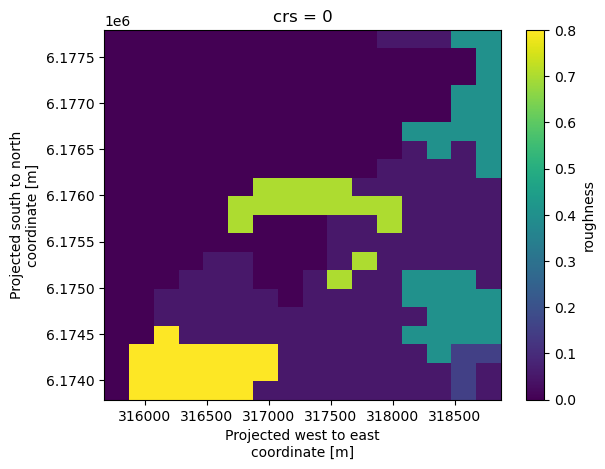
Rasterizing both the original polygons and the derived change lines at 200 m resolution should yield consistent results.
[7]:
ras = pw.io.vector_to_raster(gdf, 200, map_type="roughness")
ras = pw.io.vector_to_raster(gdf_lines_z0, 200)
Visualizing the outputs: Raster#
We can visualize map data in two ways. First, using built-in xarray plotting for the raster representation, providing a quick overview of grid-based roughness values. This can be compared with the vector-based visualization below.
[8]:
ras.plot()
Visualizing the outputs: Vector#
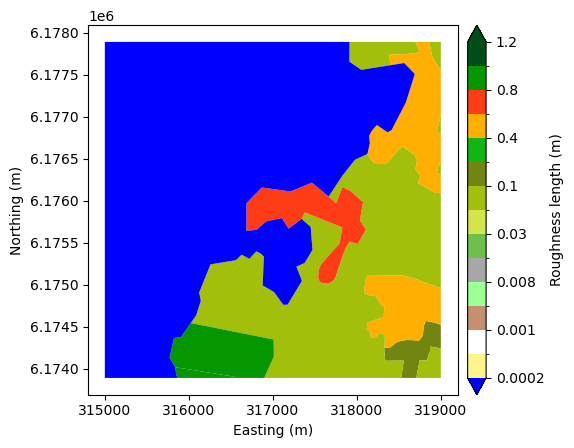
Second, we use windkit.plot.landcover_map to visualize the original vector polygons, displaying roughness lengths (z0) or landcover classes directly from the GeoDataFrame.
[9]:
wk.plot.landcover_map(gdf, "z0")
[9]:
<Axes: xlabel='Easting (m)', ylabel='Northing (m)'>
Reprojection and Benchmarking#
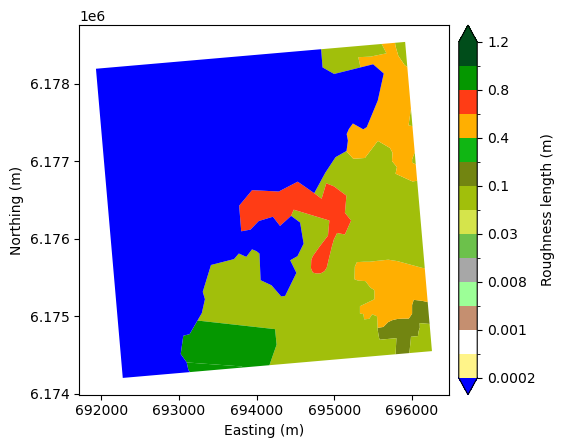
We reproject the map to EPSG:32632 to verify coordinate transformation handling. We then perform a “round-trip” test: converting polygons to lines and back to polygons to check data integrity. The landcover map can be seen to not fill a square bounding box, indicating that the polygons do not cover the entire area. Once converted to lines, these lines will be flagged as dead-end lines in the WAsP Map Editor. It is good practice to have a square bounding box for WAsP maps, as the core algorithm cuts off any lines by the total bounds of the map.
[10]:
gdf_32632 = gdf.to_crs(32632)
wk.plot.landcover_map(gdf_32632, "z0")
lines, lct = polygons_to_lines(gdf_32632, map_type="landcover", return_lctable=True)
tp_new = lines_to_polygons(lines)
Finally, we benchmark the Python implementation against the Fortran-based one, comparing execution times with and without vertex snapping. Performance depends heavily on input geometry size and complexity. The testing was done on a machine with an Intel(R) Core(TM) i7-8565U CPU @ 1.80GHz with 8GB RAM.
[11]:
# takes about 31.3 ms
wk.polygons_to_lines(gdf, snap=False, check_errors=False)
# takes about 22 ms
pw.io.polygons_to_lines(gdf, snap=False, check_errors=False)

# takes about 72 ms (most time is spent in snapping)
wk.polygons_to_lines(gdf, snap=True)
# takes about 68 ms (most time is spent in snapping)
pw.io.polygons_to_lines(gdf, snap=True)
[11]:
| geometry | z0_left | z0_right | |
|---|---|---|---|
| 0 | LINESTRING (316025.361 6174543.82, 315909.617 ... | 0.80 | 0.00 |
| 1 | LINESTRING (317666.534 6176049.551, 317467.132... | 0.70 | 0.00 |
| 2 | LINESTRING (316566.812 6173890.154, 316532.179... | 0.80 | 0.80 |
| 3 | LINESTRING (315840.234 6174017.875, 315853.684... | 0.80 | 0.00 |
| 4 | LINESTRING (316025.361 6174543.82, 317011.975 ... | 0.05 | 0.80 |
| 5 | LINESTRING (317666.534 6176049.551, 317754.859... | 0.05 | 0.70 |
| 6 | LINESTRING (319002.154 6176093.543, 318940.014... | 0.05 | 0.40 |
| 7 | LINESTRING (318871.206 6177890.154, 318874.141... | 0.05 | 0.40 |
| 8 | LINESTRING (319002.154 6176463.197, 318961.073... | 0.05 | 0.40 |
| 9 | LINESTRING (319002.154 6177024.679, 318952.814... | 0.05 | 0.40 |
| 10 | LINESTRING (317344.339 6175783.418, 317452.476... | 0.05 | 0.00 |
| 11 | LINESTRING (318125.468 6176554.398, 317980.582... | 0.05 | 0.00 |
| 12 | LINESTRING (317915.399 6177890.154, 317913.211... | 0.05 | 0.00 |
| 13 | LINESTRING (318330.039 6174248.963, 318328.62 ... | 0.15 | 0.05 |
| 14 | LINESTRING (318709.744 6173890.154, 318740.529... | 0.15 | 0.05 |
| 15 | LINESTRING (319002.154 6174521.494, 319000.624... | 0.15 | 0.40 |
| 16 | LINESTRING (319002.154 6174961.73, 318968.103 ... | 0.40 | 0.05 |
| 17 | LINESTRING (318698.506 6177890.154, 318749.438... | 0.40 | 0.05 |
| 18 | LINESTRING (318400.638 6177612.427, 318566.184... | 0.40 | 0.00 |
Handling Partial Metadata: Roughness-only and ID-only#
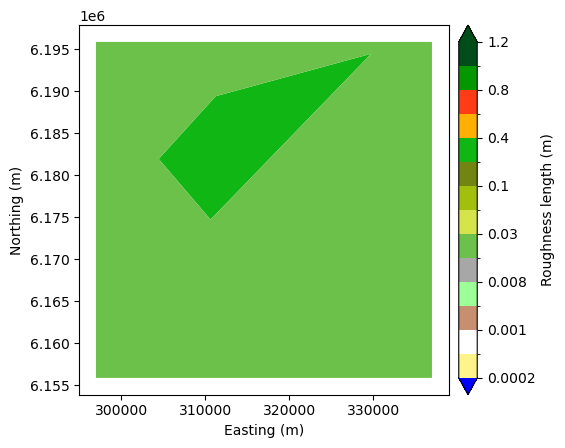
This section uses a synthetic feature collection to test polygons_to_lines with incomplete input data:
Roughness only: Works if
z0is present, even if IDs are missing.ID only: Requires a
LandCoverTableto map IDs to roughness lengths. We demonstrate passing this table explicitly.
[12]:
area = json.loads("""
{"type": "FeatureCollection", "features": [{"id": "0", "type": "Feature", "properties": {"id": 1, "z0": 0.3, "d": 0.0, "desc": null}, "geometry": {"type": "MultiPolygon", "coordinates": [[[[311259.8422840722, 6189423.7293760665], [304473.36837506725, 6181958.608076162], [310642.8901105263, 6174740.267645675], [329768.40749044926, 6194482.7371991435], [311259.8422840722, 6189423.7293760665]]]]}}, {"id": "1", "type": "Feature", "properties": {"id": 2, "z0": 0.01, "d": 0.0, "desc": null}, "geometry": {"type": "MultiPolygon", "coordinates": [[[[337002.1542929823, 6155890.153596819], [297002.1542929823, 6155890.153596819], [297002.1542929823, 6195890.153596819], [337002.1542929823, 6195890.153596819], [337002.1542929823, 6155890.153596819]], [[304473.36837506725, 6181958.608076162], [310642.8901105263, 6174740.267645675], [329768.40749044926, 6194482.7371991435], [311259.8422840722, 6189423.7293760665], [304473.36837506725, 6181958.608076162]]]]}}], "crs": {"type": "name", "properties": {"name": "urn:ogc:def:crs:EPSG::32633"}}}
""")
gdf = gpd.GeoDataFrame.from_features(
    area["features"], crs=area["crs"]["properties"]["name"]
)
wk.plot.landcover_map(gdf, "z0")

gdf_no_id = gdf.drop(columns=["id", "d", "desc"])
lc = polygons_to_lines(gdf_no_id)

gdf_no_z0 = gdf.drop(columns=["z0", "d", "desc"])
# this raises a ValueError because there is no landcover table provided
try:
    lines, lct = polygons_to_lines(gdf_no_z0, map_type="landcover", return_lctable=True)
except KeyError as e:
    print("ValueError:", e)

# this works fine
lines, lct = polygons_to_lines(
    gdf_no_z0,
    lctable=wk.LandCoverTable.get_table("CORINE"),
    map_type="landcover",
    return_lctable=True,
)
ValueError: "Column 'z0' is missing. You have to specify the `lctable` argument with a wk.LandCoverTable with a mapping from an integer 'id' to 'z0' and optionally 'd'."
Topological Edge Case: Polygons with Holes#
Polygons containing holes can be problematic for WAsP.
If
external_roughnessisNone, conversion raises an error as removing lines enclosing the hole creates an invalid map.If
external_roughnessis provided, the function warns the user but proceeds, applying the background roughness to the hole.
[13]:
area = json.loads("""
{"type": "FeatureCollection", "features": [{"id": "0", "type": "Feature", "properties": {"id": 1, "z0": 0.3, "d": 0.0, "desc": null}, "geometry": {"type": "MultiPolygon", "coordinates": [[[[311259.8422840722, 6189423.7293760665], [304473.36837506725, 6181958.608076162], [310642.8901105263, 6174740.267645675], [329768.40749044926, 6194482.7371991435], [311259.8422840722, 6189423.7293760665]]]]}}, {"id": "1", "type": "Feature", "properties": {"id": 2, "z0": 0.01, "d": 0.0, "desc": null}, "geometry": {"type": "MultiPolygon", "coordinates": [[[[297002.1542929823, 6195890.153596819], [337002.1542929823, 6195890.153596819], [337002.1542929823, 6155890.153596819], [297002.1542929823, 6155890.153596819], [297002.1542929823, 6195890.153596819]], [[329768.40749044926, 6194482.7371991435], [310025.93793698045, 6190626.786114481], [304473.36837506725, 6181958.608076162], [310642.8901105263, 6174740.267645675], [329768.40749044926, 6194482.7371991435]]]]}}], "crs": {"type": "name", "properties": {"name": "urn:ogc:def:crs:EPSG::32633"}}}
""")
gdf_hole = gpd.GeoDataFrame.from_features(
    area["features"], crs=area["crs"]["properties"]["name"]
)
wk.plot.landcover_map(gdf_hole, "z0")

try:
    lines, lct = polygons_to_lines(
        gdf_hole, external_roughness=None, map_type="landcover", return_lctable=True
    )
except ValueError as e:
    print("ValueError:", e)
ValueError: There is holes in your map. The area specified by the outer boundary of your polygons (the convex hull) is not the same as the sum of the areas of the polygons. You can fix this by specifying a external roughness length with the `external_roughness` argument, but all the holes in your map will be filled with this roughness value.
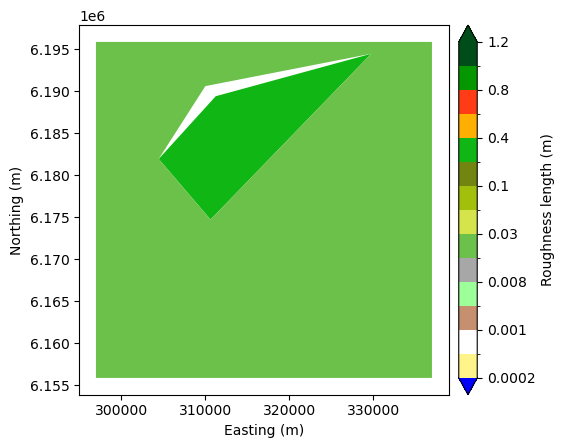
[14]:
# This works, but with a warning
lines, lct = polygons_to_lines(
    gdf_hole, external_roughness=0.9, map_type="landcover", return_lctable=True
)
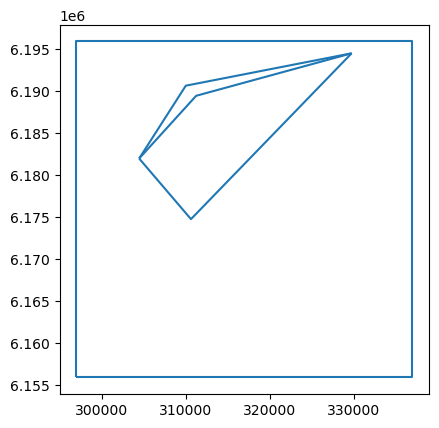
lines.plot()
/builds/ram/software/pywasp/pywasp/modules/windkit/windkit/topography/_vectormap_helpers.py:413: UserWarning: There is holes in your map. The area specified by the outer boundary of your polygons (the convex hull) is not the same as the sum of the areas of the polygons. These areas will get the roughness length specified by external_roughness, even though they are not at the edge of the map.
  warnings.warn(
[14]:
<Axes: >
Topological Edge Case: Overlapping Polygons#
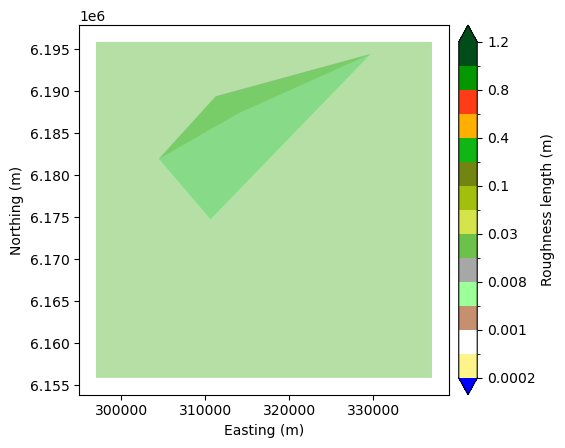
Overlapping polygons create ambiguous roughness definitions, leading to “line-face inconsistencies” when converted to change lines. A line-face inconsistency occurs when the roughness value defined on a change line does not match the roughness of the polygon (face) it borders. This ambiguity can confuse the flow model, potentially causing incorrect wind speed predictions.
We visualize the overlap using transparency (darker color is the overlapping area), then perform the conversion. In QGIS, overlapping polygons can be easily found by using the Topology Checker Plugin in Plugin Manager. Add your polygonal layer in Topology Rule Settings window, select “must not overlap” rule and add them. To see overlap errors click on Validate button. Once you have converted to change lines, you can use the WAsP Map Editor to identify and inspect “Line-Face-Roughness” errors. The resulting change line map is saved for further analysis.
[15]:
area = json.loads("""
{"type": "FeatureCollection", "features": [{"id": "0", "type": "Feature", "properties": {"id": 1, "z0": 0.3, "d": 0.0, "desc": null}, "geometry": {"type": "MultiPolygon", "coordinates": [[[[311259.8422840722, 6189423.7293760665], [304473.36837506725, 6181958.608076162], [310642.8901105263, 6174740.267645675], [329768.40749044926, 6194482.7371991435], [311259.8422840722, 6189423.7293760665]]]]}}, {"id": "1", "type": "Feature", "properties": {"id": 2, "z0": 0.01, "d": 0.0, "desc": null}, "geometry": {"type": "MultiPolygon", "coordinates": [[[[297002.1542929823, 6195890.153596819], [337002.1542929823, 6195890.153596819], [337002.1542929823, 6155890.153596819], [297002.1542929823, 6155890.153596819], [297002.1542929823, 6195890.153596819]], [[329768.40749044926, 6194482.7371991435], [314005.27945635153, 6187418.634812043], [304473.36837506725, 6181958.608076162], [310642.8901105263, 6174740.267645675], [329768.40749044926, 6194482.7371991435]]]]}}], "crs": {"type": "name", "properties": {"name": "urn:ogc:def:crs:EPSG::32633"}}}
""")
gdf_overlap = gpd.GeoDataFrame.from_features(
    area["features"], crs=area["crs"]["properties"]["name"]
)
wk.plot.landcover_map(gdf_overlap, "z0", alpha=0.5)
[15]:
<Axes: xlabel='Easting (m)', ylabel='Northing (m)'>
[16]:
try:
    lines, lct = polygons_to_lines(
        gdf_overlap, external_roughness=0.9, map_type="landcover", return_lctable=True
    )
except ValueError as e:
    print("ValueError:", e)

# You can inspect this file in the map editor by uncommenting and executing this line
# wk.landcover_map_to_file(lines, HOMEDIR / "tmp_rou_with_lfr.map", lctable=lct)
ValueError: There is overlapping polygons in your map. The area of the dissolved map is not the same as the sum of the areas of the individual polygons. Please fix these issues using a program like QGIS
Topological Edge Case: Missing Vertices (Snapping)#
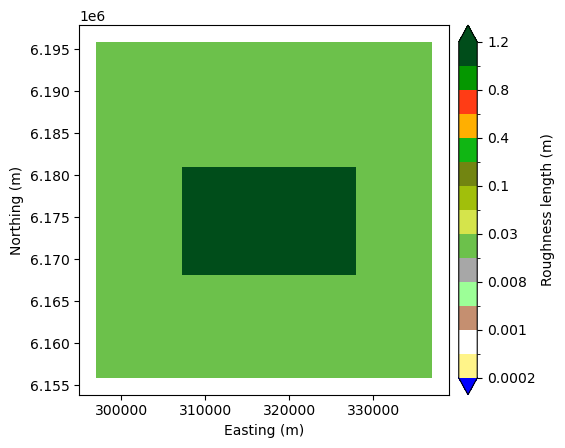
Some geometry sources produce adjacent polygons that do not share vertices at T-junctions. This becomes problematic when converting to change lines, because it introduces “Cross-point” errors in the map editor and WAsP. A cross-point occurs when two change lines intersect without a shared vertex, leading to ambiguity in roughness definitions at that point.
With Snapping (Default): Inserts necessary vertices, creating valid topology.
Without Snapping: Runs faster but produces a map with “Cross-point” errors.
We save both outputs to demonstrate the difference.
[17]:
area = json.loads("""
{"type": "FeatureCollection", "features": [{"id": "0", "type": "Feature", "properties": {"id": 2, "z0": 0.01, "d": 0.0, "desc": null}, "geometry": {"type": "MultiPolygon", "coordinates": [[[[297002.1542929823, 6195890.153596819], [337002.1542929823, 6195890.153596819], [337002.1542929823, 6155890.153596819], [297002.1542929823, 6155890.153596819], [297002.1542929823, 6195890.153596819]], [[307261.8398003997, 6168139.739435189], [307261.8398003997, 6180999.023657854], [327965.2873988902, 6180999.023657854], [327965.2873988902, 6168139.739435189], [307261.8398003997, 6168139.739435189]]]]}}, {"id": "1", "type": "Feature", "properties": {"id": 3, "z0": 1.1, "d": 0.0, "desc": null}, "geometry": {"type": "MultiPolygon", "coordinates": [[[[307261.8398003997, 6168139.739435189], [307261.8398003997, 6174569.381546522], [307261.8398003997, 6180999.023657854], [317613.5635996449, 6180999.023657854], [327965.2873988902, 6180999.023657854], [327965.2873988902, 6174569.381546522], [327965.2873988902, 6168139.739435189], [317613.5635996449, 6168139.739435189], [307261.8398003997, 6168139.739435189]]]]}}], "crs": {"type": "name", "properties": {"name": "urn:ogc:def:crs:EPSG::32633"}}}
""")
gdf_missing_vertices = gpd.GeoDataFrame.from_features(
    area["features"], crs=area["crs"]["properties"]["name"]
)
wk.plot.landcover_map(gdf_missing_vertices, "z0")

lines, lct = polygons_to_lines(
    gdf_missing_vertices,
    external_roughness=0.4,
    map_type="landcover",
    return_lctable=True,
)
# You can inspect this file in the map editor by uncommenting and executing this line
# wk.landcover_map_to_file(lines, HOMEDIR / "tmp_rou_without_crosspoint.map", lctable=lct)

lines, lct = polygons_to_lines(
    gdf_missing_vertices,
    external_roughness=0.4,
    snap=False,
    map_type="landcover",
    return_lctable=True,
)
# You can inspect this file in the map editor by uncommenting and executing this line
# wk.landcover_map_to_file(lines, HOMEDIR / "tmp_rou_with_crosspoint.map", lctable=lct)
Disconnected Polygons and Site Effects#
For maps with disjoint polygons (e.g., islands or specific landcover patches), external_roughness must be specified to define the background value. We demonstrate a full workflow: creating a topography map from these polygons and a flat elevation model, then calculating site effects using pywasp.
[18]:
area = json.loads("""
{"type": "FeatureCollection", "features": [{"id": "0", "type": "Feature", "properties": {"id": 1, "z0": 0.05, "d": 0.0, "desc": null}, "geometry": {"type": "MultiPolygon", "coordinates": [[[[303652.96510379284, 6175776.640083307], [302336.20834703604, 6164743.1265697945], [316139.4515902793, 6158023.1265697945], [329806.47861730633, 6172779.883326551], [303652.96510379284, 6175776.640083307]]]]}}, {"id": "1", "type": "Feature", "properties": {"id": 2, "z0": 0.25, "d": 0.0, "desc": null}, "geometry": {"type": "MultiPolygon", "coordinates": [[[[320362.154292982, 6192712.856299524], [309873.5056443334, 6183858.80224547], [328126.47861730633, 6178864.207650876], [330169.7218605496, 6191713.937380605], [320362.154292982, 6192712.856299524]]]]}}], "crs": {"type": "name", "properties": {"name": "urn:ogc:def:crs:EPSG::32633"}}}
""")
seperate = gpd.GeoDataFrame.from_features(
    area["features"], crs=area["crs"]["properties"]["name"]
)
wk.plot.landcover_map(seperate, "z0")
lines, lct = polygons_to_lines(
    seperate, external_roughness=0.0, map_type="landcover", return_lctable=True
)
/builds/ram/software/pywasp/pywasp/modules/windkit/windkit/topography/_vectormap_helpers.py:413: UserWarning: There is holes in your map. The area specified by the outer boundary of your polygons (the convex hull) is not the same as the sum of the areas of the polygons. These areas will get the roughness length specified by external_roughness, even though they are not at the edge of the map.
  warnings.warn(
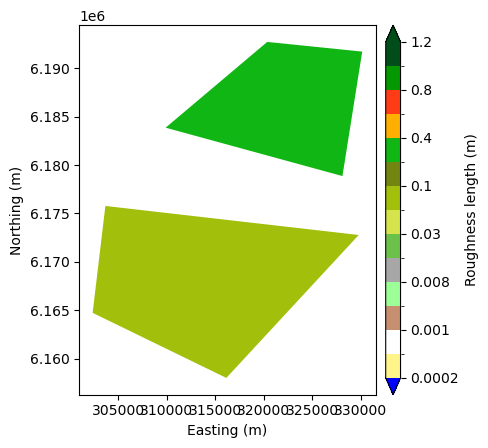
[19]:
try:
    lines, lct = polygons_to_lines(seperate)
except ValueError as e:
    print("ValueError:", e)
ValueError: There is holes in your map. The area specified by the outer boundary of your polygons (the convex hull) is not the same as the sum of the areas of the polygons. You can fix this by specifying a external roughness length with the `external_roughness` argument, but all the holes in your map will be filled with this roughness value.
Using an external roughness length#
Note that a warning is issued because the polygons are disconnected. We then create a flat elevation map (elev) and use it with the polygon roughness map to compute site effects at specified locations ds using get_site_effects
[20]:
bb = wk.spatial.BBox.from_cornerpts(
    302336.20834704,
    6158023.12656979,
    330169.72186055,
    6192712.85629952,
    crs=seperate.crs,
)
ds = bb.to_grid(20000, 50)
elev = wk.create_vector_map(bbox=bb, map_type="elevation", elevation=0.0)

topo = pw.wasp.TopographyMap(elev, seperate, external_roughness=0.0)
se = topo.get_site_effects(ds, n_sectors=12)
/builds/ram/software/pywasp/pywasp/modules/windkit/windkit/topography/_vectormap_helpers.py:413: UserWarning: There is holes in your map. The area specified by the outer boundary of your polygons (the convex hull) is not the same as the sum of the areas of the polygons. These areas will get the roughness length specified by external_roughness, even though they are not at the edge of the map.
  warnings.warn(
When to use check_errors#
Checking errors can significantly increase computation time for large maps. Use it judiciously based on the quality of your input data. If you are sure your map comes from a reliable source (e.g. it has been converted from raster) you can set check_errors=False in the Topography map (see below). If you are using polygons, it is recommended to always use snapping to avoid topological errors.
[21]:
topo = pw.wasp.TopographyMap(
    elev,
    seperate,
    external_roughness=0.0,
    check_errors=False
    )